Identifying the real problem
Detection engineers spend their days writing and managing the rules that define how security events are surfaced and handled across customer environments. It's precise, high-stakes work, and the tooling that surrounds it has real consequences. Too much friction in the pipeline means slower detection releases, and slower releases mean longer exposure windows for customers.
The Detection Workbench started as a developer-led proof-of-concept built to address that problem. The POC solved the hard technical piece: getting the code written and converted into a deployable rule. What it didn't solve was the workflow surrounding that work. There were not considerations made for the handoffs, the reviews, the coordination across multiple teams, the external tools still required at each step. Those gaps were acknowledged and standing when I was brought onto the project.
The team brought me in after the POC launched, once end users started pushing against its edges. The questions piling up were bigger than the engineering team could answer alone, and it was clear that getting from "technically functional" to "actually works for the people using it every day" required a different kind of investment.
What looked like a design project turned out to be a workflow redesign, and the users made that clear during our initial kickoff.
A fresh perspective
The business case for the workbench had already been validated. A dedicated detection engineering platform had clear, defined ROI and success metrics: reduce time-to-release for new detections, cut the operational overhead of managing rules across a complex security environment. My role was to answer the harder questions the POC had left open, defining how it should actually work for the people building detections every day.
Working directly with the CTO acting as PM put real decision-making authority in the room, and that visibility also meant timeline expectations were serious and scope questions carried weight.
Working Conditions
Timeline pressure was constant as this was a product the team was already using and needed it to add even more value. The subject matter required a steep learning curve, as detection engineering is a highly technical domain, and I had to understand it well enough to design for it credibly. What was initially scoped as "design tweaks" became a full overhaul once research revealed how deep the workflow problems actually went. Requirements also continued to evolve as technical feasibility and user needs clarified in real time, which meant staying flexible without losing momentum.
Digging into the details
The existing workflow had three core breakdowns. On their own, any one would have been frustrating, but together, they created a release pipeline that was slower, more error-prone, and harder to manage than it needed to be for a team doing precision work under real security pressure.
Tool Sprawl
Completing a detection rule required moving across too many external tools. The POC had started to consolidate the technical work, but the review and documentation portions of the workflow were still scattered across separate systems. Every context switch was an opportunity for dropped threads and reduced efficiencies.
Sequential Handoff Bottlenecks
Multiple teams had to review and contribute to each detection rule in a specific order, with each team finishing before the next could start. One team's delay held up everyone downstream. The pipeline did not always need to be linear, and we started identifying places where concurrent work could happen.
Management Visibility Gap
Team leads and managers had no centralized view of where rules stood at any given time, and it was difficult even for individual rule authors to track the ones on their plate, whether in-progress or released for monitoring. Checking on the status of a rule meant pinging teammates directly or cross-referencing tools that weren't built for oversight.
Following a rule from idea to release
Before touching wireframes, I needed to understand the full detection rule authoring process, not just the technical steps a single engineer takes, but every team that touches a rule and everything that happens between steps. My goal was to complete thorough documentation of the process that could serve as solid context moving forward.
I interviewed threat research engineers at multiple levels, from management to individual contributors. I also interviewed the documentation team and the internal SOC, both of whom were part of the review chain but rarely asked about their experience of it. Everyone I spoke with had a piece of the picture, and the journey map was how I assembled them.
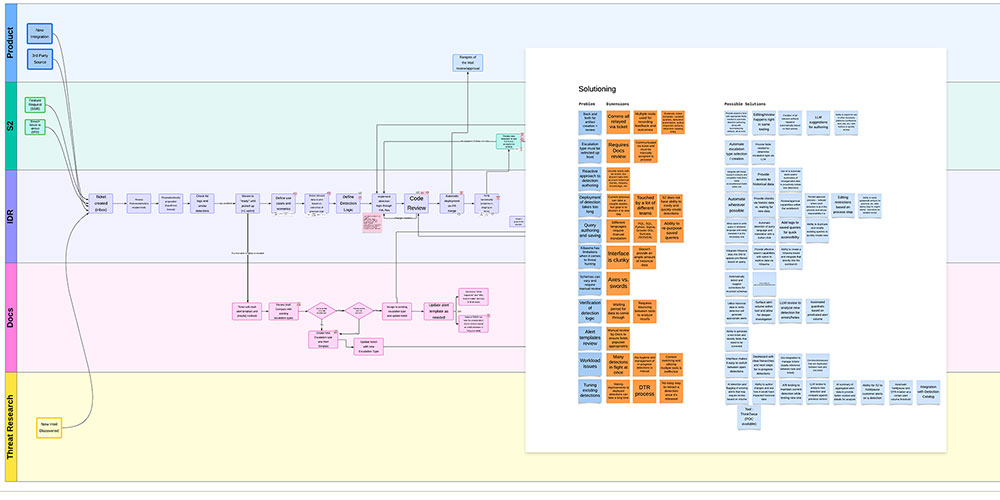
The most significant finding wasn't about any single pain point, but was in fact structural. Two patterns emerged across the journey map. First: a large portion of the process was sequential by convention, not by necessity. Steps that were waiting on each other had no real dependency between them and could run in parallel. Second: a meaningful number of manual inputs and review triggers were strong candidates for AI-assisted automation. Neither required inventing new workflows. Both just needed someone to see the existing one clearly enough to redesign it.
The journey map didn't just show where the workflow was broken. It showed exactly where automation and visibility could make the biggest difference.
Verify before you build. Build before you polish.
Because the subject matter was highly technical and the stakeholders were deeply expert, I couldn't afford to design in isolation and present solutions cold. The process was deliberately iterative, and I sought input early and often, catching problems at the lowest-fidelity stage possible.
Journey Map Verification
Before drawing a single wireframe, I brought the completed journey map back to every person I'd interviewed to verify accuracy. If the map was wrong, everything built on it would be wrong too. This step also helped build trust with stakeholders who needed to feel heard before they'd consider significant change.
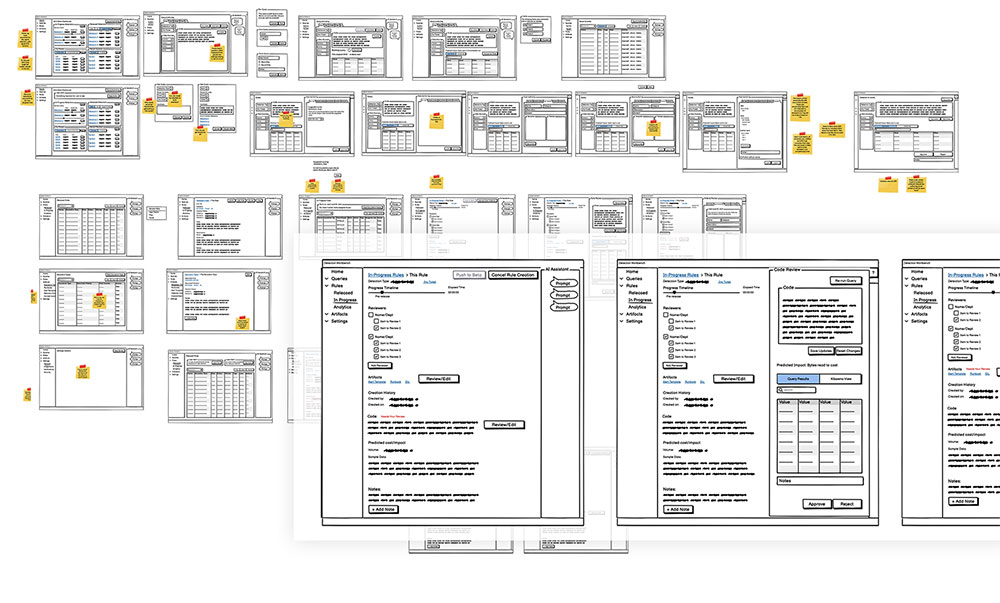
Wireframes for Workflow Buy-In
I started with wireframes focused on the workflow architecture, not the visual design. The goal was to get alignment on the proposed process changes before investing in fidelity. Threat research engineers gave input on every step, flagging technical constraints and user needs I hadn't anticipated.
Engineering Feasibility Review
Once stakeholders were satisfied with the wireframe direction, I brought proposals to the engineering team before moving to high-fidelity. Catching technical red flags at the wireframe stage is much cheaper than catching them in Figma. It also built engineering confidence in the direction before the heavier investment began.
High-Fidelity Figma Design
The engineering team needed fine-tuned direction on every component, and end users wanted to verify all the details. High-fidelity served not just as polish, but became a key communication tool, especially as we often checked in async across multiple time zones. I built designs with the specificity the team needed to implement and the users needed to validate.
Iterative Review Rounds
Frequent stakeholder reviews continued through the full high-fidelity phase. Given the technical complexity and evolving requirements, locking into a static spec early would have been a mistake. Staying in close review kept the design grounded in what was technically feasible and practically useful.
Revisiting the workflow before tackling the UI
The research was clear: the sequential handoff structure was a root cause, not a symptom. Digitizing the existing linear process would have been faster to build and easier to sell, but it would have addressed the surface without solving the problem. The decision was to propose a concurrent task model instead, where steps across teams could be triggered in parallel and tracked visually in context.
This was a harder ask of engineering and a bigger conceptual shift for stakeholders. It required grounding every proposal in the journey map evidence to earn the room for that conversation.
A platform that acheives even the unstated goals
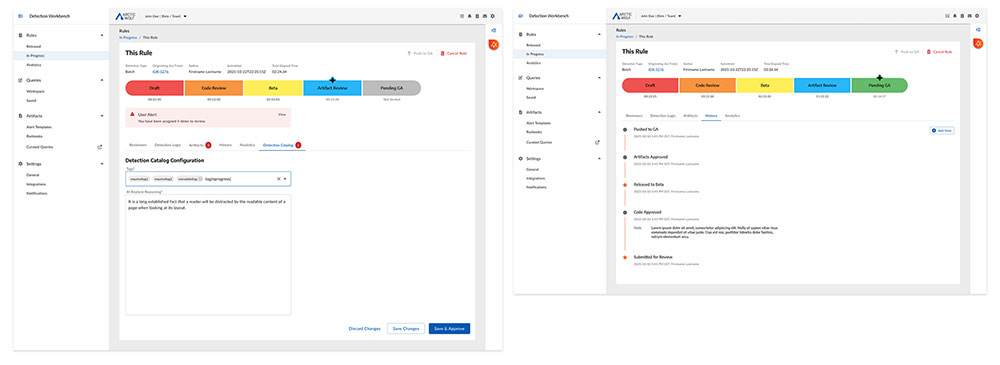
The final design addressed all three problems directly. We focused on reducing external tool dependencies, breaking the sequential handoff bottleneck, and giving management real-time visibility into the release pipeline. It also surfaced a concrete roadmap of where AI-assisted automation could eliminate manual steps that had no good reason to stay manual. Five design moves defined the solution.
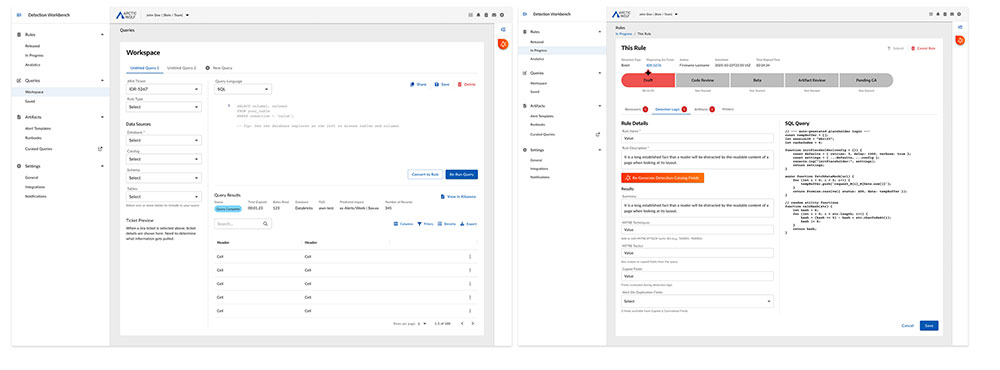
In-Workflow Artifact Editing
Review and documentation surfaces that previously lived in external tools were brought directly into the workbench workflow. Reviewers no longer needed to leave the platform to complete their portion of the release process, eliminating a significant source of context switching and tool overhead.
Visual Pipeline Progress Indicator
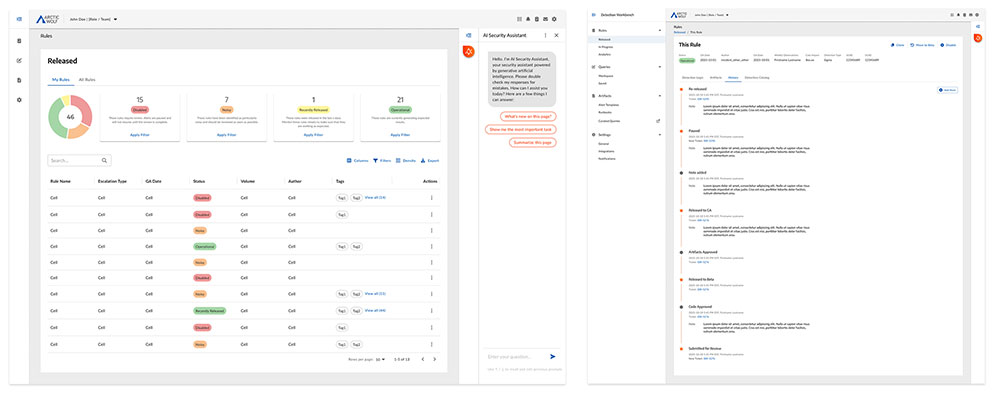
A real-time view of where a detection rule stood in the release pipeline, tied directly to key metrics, including time-to-release and noisiness/cost. Anyone on the team could see the status of any rule without chasing updates or cross-referencing external trackers.
Concurrent Action Items
Instead of waiting for linear handoffs, the new system triggered parallel tasks at the start of the process. Each team could begin their portion of the work independently, without waiting for the previous team to finish first. The structure reflected how the work actually could run, not how convention had constrained it.
AI Automation Opportunity Mapping
Research identified several manual review triggers and documentation steps with no meaningful human judgment requirement. Rather than designing around them, I surfaced them explicitly as near-term AI integration points within the workflow UI. This gave engineering a prioritized, design-informed roadmap for where intelligent automation would add real efficiency without introducing risk into a high-stakes process.
Management Dashboard & Rule History
A dedicated management view gave team leads real-time visibility across all rules, with the ability to filter by status (Released, In Progress), surface key metrics at a glance (total count, noisy flags, recently released), and access a per-rule history timeline that logged every stage transition and reviewer action from submission through release. Oversight went from reactive to immediate.
Adopted before it finished shipping
The clearest signal of the design's impact wasn't a post-launch metric. The threat research team began adopting the workbench while it was still in active development, a direct indicator that the workflow improvements were immediately legible and valuable enough to switch for before the product was complete.
Beyond the metrics, the project reframed what the workbench could be. What started as a code editor became the operational center of the detection engineering process, a meaningful shift in scope, team dependency, and platform value.
The redesign also created a foundation for AI integration the platform had never had before. By making each step's inputs, outputs, and handoff conditions explicit, the workflow structure became something engineering could reason about programmatically. The automation opportunities identified during research had a clear home to land in. That was a design outcome as intentional as anything visible in the UI.
What this project changed about how I work
Being brought in post-POC isn't a limitation, but you have to earn the room. The journey map gave me the standing to propose significant rework of an existing concept, allowing me to base redesign recommendations on documented, verified user evidence. This made the difference between "the designer wants to redo our work" and "here's what we're missing and here's the data behind it." Engineering teams that might have resisted redesign instincts accepted evidence-based restructuring.
In technical domains, the fastest path to good solutions is sometimes the slowest path to first wireframe. Front-loading research and verifying the journey map before touching Figma felt like it was costing time. In practice, it prevented weeks of misdirection and meant that by the time I was designing, the team was already aligned on what we were solving. The investment paid back quickly.
The bravest design proposal is often the one that challenges the process, not just the interface. Recommending a concurrent task model over a digitized version of the existing linear workflow was a harder conversation. It was also the right one. Scoping design work to UI improvements alone would have shipped faster and addressed less. The willingness to surface the structural problem, backed by evidence, is what made the project meaningful.
Designing for AI starts with mapping what humans shouldn't have to do. The clearest automation opportunities in this project didn't come from asking "where can we add AI?" They came from the journey map, which made visible exactly which manual steps had no good reason to stay manual. Research first, automation second. That sequence produces AI integration that actually fits how people work, rather than AI layered onto a process that was broken to begin with.